LinkedIn Connection Request Template
Copy. Paste. Customize. Send. Book meetings.
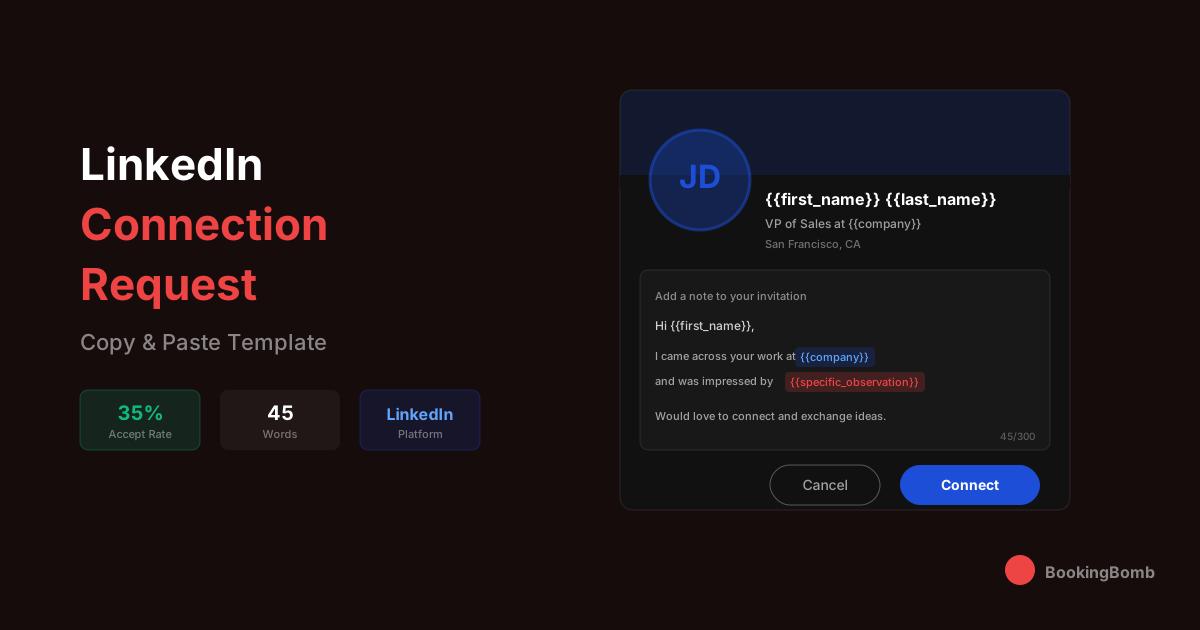
The Template
Subject:
N/A (Connection Request)
Variables to Customize
{{first_name}}Prospect's first name - LinkedIn is personal, so first names are essential
{{company}}Their current company - shows you did your homework
{{specific_observation}}Something specific you noticed (recent post, company news, job change, publication, podcast appearance) - this is the key differentiator
{{industry}}Their industry or vertical (e.g., 'SaaS', 'fintech', 'healthcare tech')
{{value_area}}The problem space you solve (e.g., 'pipeline acceleration', 'revenue operations', 'customer acquisition')
{{your_name}}Your first name - keep it personal
When to Use This
Perfect For
- • Warming up cold prospects before email outreach
- • Building a network in your target vertical
- • Connecting with decision-makers at target accounts
- • Following up after meeting someone at a conference or event
- • Engaging with prospects who've viewed your profile
- • Multi-channel outreach strategies (LinkedIn + email)
- • Reaching prospects with low email deliverability
- • Account-based marketing campaigns
Not Ideal For
- • Mass connection requests with no personalization
- • Prospects who have 'open to connect' turned off
- • Immediate sales pitches (save that for the follow-up message)
- • Very senior executives who are over-networked (may need InMail or warm intro)
- • Prospects in industries with low LinkedIn adoption
- • When you have no genuine reason to connect
Variations
Variation A: The Content Engager
Variation B: The Mutual Connection Reference
Variation C: The Event or Conference Connection
Variation D: The Job Change Congratulations
Variation E: The Industry Peer
Variation F: The Profile Viewer Follow-Up
Pro Tips
Tip 1: Keep it under 300 characters when possible. LinkedIn shows a preview of your message - if it's too long, the most compelling part gets cut off. Front-load your personalization
Tip 2: Never pitch in the connection request. The goal is to get accepted, not to close a deal. Save the pitch for the follow-up message 2-3 days after they accept
Tip 3: Reference something specific and recent. A post from last week, a job change, company news, or a mutual connection. Generic 'I'd like to add you to my network' messages get ignored
Tip 4: Engage with their content before connecting. Like and comment on 2-3 of their posts over a week before sending the request. When they see your name, it's already familiar
Tip 5: Time your requests strategically. Tuesday through Thursday mornings tend to have higher acceptance rates. Avoid weekends and Monday mornings when LinkedIn activity is lowest
Tip 6: Follow up within 48 hours of acceptance. Strike while the iron is hot. A quick 'Thanks for connecting, {{first_name}}' message keeps you top of mind and opens the door for a real conversation
A/B Testing Suggestions
Test personalized connection messages vs. no message at all - surprisingly, blank requests sometimes perform well for senior prospects who get too many sales messages
A/B test mentioning mutual connections vs. not mentioning them - mutual connections typically boost acceptance rates by 20-30%
Compare content-engagement hooks ('loved your post about X') vs. company-focused hooks ('impressed by what {{company}} is doing with Y')
Test shorter messages (under 200 characters) vs. longer messages (250-300 characters) to find the sweet spot
Try question-based requests ('Would love to connect and hear your thoughts on X') vs. statement-based ('Thought there might be interesting overlap')
Experiment with time-of-day sending: morning (7-9am) vs. lunch (12-1pm) vs. evening (5-7pm)
Explore More
Sales Articles
LinkedIn prospecting strategies and social selling guides
Sales Glossary
LinkedIn-specific terms like SSI, InMail, and connection limits
Playbooks
Complete LinkedIn outreach playbooks and multi-channel sequences
Benchmarks
LinkedIn acceptance rates and response benchmarks by industry
Lead Sources
How to build targeted prospect lists using LinkedIn
Tool Comparisons
LinkedIn automation tools and Sales Navigator alternatives
Related Templates
Templates Are Just the Start
We send thousands of these every week. Let us do the heavy lifting while you close deals.
Book Your Strategy Call